2015/07/23 Edit: All of these problems should now be fixed in the latest Roslyn NuGet packages
We first looked at MSBuildWorkspace in Part 6 Working with Workspaces. MSBuildWorkpace works really well when loading up solutions from .sln files. It properly understands .csproj files so we don’t have to worry about tracking down references, documents, or MSBuild targets.
However, when compiling solutions that contained Portable Class Libraries (PCLs) I had been continuously running into frustrating problems with missing references to System.Runtime.dll. For example I’d see a handful of errors like:
error CS0012: The type 'Object' is defined in an assembly that is not referenced.

You must add a reference to assembly 'System.Runtime, Version=4.0.0.0, Culture=neutral, PublicKeyToken=b03f5f7f11d50a3a'.
I’d also seen this issue pop up within Visual Studio when working on XAML and when debugging.
In our case we needed to add a reference to System.Runtime.dll. I won’t bother to show the code for this as it’s fraught with its own set of problems. Although it resolves our System.Object reference, we quickly run into other problems with other types such as System.Tasks.Task. Manually adding these references was definitely not going to scale.
The Workaround
Originally this problem was reported as a bug within MSBuildWorkspace. After all, why wouldn’t it resolve the references properly when we open the solution? Visual Studio obviously seemed to be capable of figuring the references out…
It turns out there’s a MSBuild property called CheckForSystemRuntimeDependency. And we can set this to true and all our PCL worries seem to go away.
Simply create your MSBuildWorkspace with:
This file contains hidden or bidirectional Unicode text that may be interpreted or compiled differently than what appears below. To review, open the file in an editor that reveals hidden Unicode characters. Learn more about bidirectional Unicode characters
At Code Connect we’ve been working hard on a project that rewrites a user’s code and then compiles the rewritten solution. Without giving too much away, it essentially acts as a logger and can intercept all variable assignments.
So the following code:
This file contains hidden or bidirectional Unicode text that may be interpreted or compiled differently than what appears below. To review, open the file in an editor that reveals hidden Unicode characters. Learn more about bidirectional Unicode characters
This file contains hidden or bidirectional Unicode text that may be interpreted or compiled differently than what appears below. To review, open the file in an editor that reveals hidden Unicode characters. Learn more about bidirectional Unicode characters
At some point we decided we no longer wanted to inject the LogValue method directly into the code we were instrumenting. We would place it in an entirely different namespace: CodeConnect.Instrumentation.
Here was how we originally created the invocation to LogValue:
This file contains hidden or bidirectional Unicode text that may be interpreted or compiled differently than what appears below. To review, open the file in an editor that reveals hidden Unicode characters. Learn more about bidirectional Unicode characters
So we figured we’d incorporate our new namespace as follows:
This file contains hidden or bidirectional Unicode text that may be interpreted or compiled differently than what appears below. To review, open the file in an editor that reveals hidden Unicode characters. Learn more about bidirectional Unicode characters
At first glance, everything checked out. Calling .ToFullString() on this node revealed what looked like a proper invocation:
CodeConnect.Instrumentation.LogValue("x", 5);
However, try as we may we could not get our code to compile. We would constantly errors telling us the CodeConnect.Instrumentation type didn’t exist:
CS0103 at line 12 (character 19): The name 'CodeConnect.Instrumentation' does not exist in the current context.
We checked our references, we checked our rewritten solution and we checked the spelling at least a dozen times. Everything checked out. Eventually we did the classic “Which change broken this functionality?” walk through out Git history. (Note: If I had written more complete unit tests when I first wrote the rewriter, we would have caught this a lot quicker!)
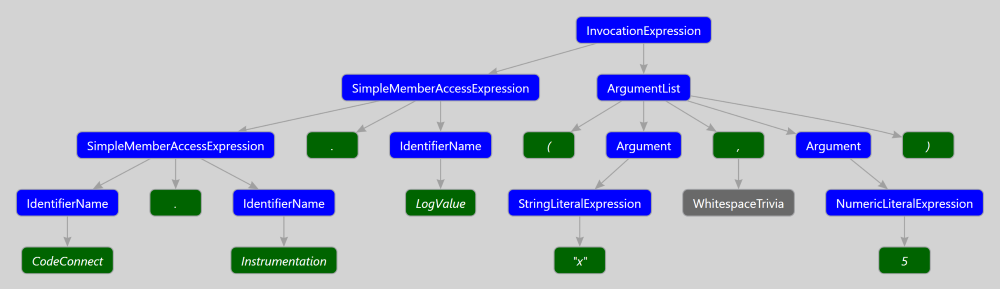
We realized it was the change to the rewriter that introduced this problem. It took some time before we realized exactly what was wrong. Once again the ever-truthful Syntax Visualizer (now packaged with the .NET Compiler Tools SDK) came to the rescue and showed us what the syntax tree for a valid invocation of CodeConnect.Instrumentation.LogValue("x", 5); would look like:
After looking over the above tree, we realized we were supposed to create a chain of SimpleMemberAccessExpressions, not a single InvocationExpression with the name “CodeConnect.Instrumentation.LogValue”. When the binder when to bind this invocation to a symbol, it failed as no method can be declared with this name. The tree we had created was invalid and could never have been parsed out of a user’s source code.
This is a key point to understand when creating or rewriting syntax trees:
No one will stop you from creating invalid syntax trees.
> The Roslyn Syntax construction API does not guarantee that you can only build valid programs.
We can take this to its logical extreme and create trees that don’t make any sense. For example, we can create WhitespaceTrivia whose value is “public void M() { }” .
This file contains hidden or bidirectional Unicode text that may be interpreted or compiled differently than what appears below. To review, open the file in an editor that reveals hidden Unicode characters. Learn more about bidirectional Unicode characters
The output is misleading as it causes the reader to make assumptions about how the syntax tree must be formed. In my experience the only true arbiter of truth when it comes to syntax tree is the Roslyn Syntax Visualizer. I’d love for it to be expanded to visualize in memory trees while debugging.
The takeaways here:
Don’t trust .ToString() or .ToFullString()
Understand that you may accidentally generate invalid trees
Control flow analysis is used to understand the various entry and exit points within a block of code and to answer questions about reachability. If we’re analyzing a method, we might be interested in all the points at which we can return out of the method. If we’re analyzing a for-loop, we might be interested in all the places we break or continue.
We trigger control flow analysis via an extension method on the SemanticModel. This returns an instance of ControlFlowAnalysisto us that exposes the following properties:
EntryPoints – The set of statements inside the region that are the destination of branches outside the region.
ExitPoints – The set of statements inside a region that jump to locations outside the region.
EndPointIsReachable – Indicates whether a region completes normally. Returns true if and only if the end of the last statement is reachable or the entire region contains no statements.
ReturnStatements – The set of returns statements within a region.
Succeeded – Returns true if and only if analysis was successful. Analysis can fail if the region does not properly span a single expression, a single statement, or a contiguous series of statements within the enclosing block.
Basic usage of the API:
This file contains hidden or bidirectional Unicode text that may be interpreted or compiled differently than what appears below. To review, open the file in an editor that reveals hidden Unicode characters. Learn more about bidirectional Unicode characters
Alternatively, we can specify two statements and analyze the statements between the two. The following example demonstrates this and the usage of EntryPoints:
This file contains hidden or bidirectional Unicode text that may be interpreted or compiled differently than what appears below. To review, open the file in an editor that reveals hidden Unicode characters. Learn more about bidirectional Unicode characters
In the above example, we see an example of a possible entry point label L3. To the best of my knowledge, labels are the only possible entry points.
Finally, we’ll take a look at answering questions about reachability. In the following, neither the start point or the end point is reachable:
This file contains hidden or bidirectional Unicode text that may be interpreted or compiled differently than what appears below. To review, open the file in an editor that reveals hidden Unicode characters. Learn more about bidirectional Unicode characters
Overall, the Control Flow API seems a lot more intuitive than the Data Flow Analysis API. It requires less knowledge of the C# specification and is straightforward to work with. At Code Connect, we’ve been using it when rewriting and logging methods. Although it looks like no one has experimented much with this API, I’m really interested to see what uses others will come up with.
The nameof operator has gone through five iterations as the Roslyn team worked to nail down its syntax and semantics. Now that the design of the nameof operator has been finalized, we can look at some simple examples.
Within C#, nameof is a contextual keyword. This means there is no way to distinguish the nameof keyword from a call to a method that happens to be named nameof.
In C#, nameof is stored in a normal InvocationExpressionSyntax node with a single argument. That is because in C# ‘nameof’ is a contextual keyword, which will only become the “nameof” operator if it doesn’t already bind to a programmatic symbol named “nameof”
Identifying nameof Expressions
This means we can only identify nameof expressions at the semantic level. We do so by finding all invocations to “nameof” that do not bind to any symbol. These invocations must also be standalone (ie. not part of a member access like MyClass.nameof())
This file contains hidden or bidirectional Unicode text that may be interpreted or compiled differently than what appears below. To review, open the file in an editor that reveals hidden Unicode characters. Learn more about bidirectional Unicode characters
As with all contextual keywords, it’s a bit of a pain to work with. But that’s the price we pay for backwards compatability.
Creating a nameof expression
Previous versions of the Roslyn API allowed for direct creation of a NameOfExpressionSyntax. Now we must create an InvocationExpressionSyntax with the identifer “nameof”.
For example, we can generate the following nameof expression:
string result = nameof(result);
This file contains hidden or bidirectional Unicode text that may be interpreted or compiled differently than what appears below. To review, open the file in an editor that reveals hidden Unicode characters. Learn more about bidirectional Unicode characters
Side Note: As a mere mortal, I have no idea how to work with the SyntaxFactory API. I generated the above code with Kirill Osenkov’s fantastic Roslyn Quoter tool.
The important takeaway is that (at the syntax level) nameof expressions are no different than regular invocations.
Writing this blog post has been really painful. It’s been three months since I last published my introduction to the semantic model and I’ve been putting off this post for as long as I could. I started a new series called Learn Roslyn Now Quick Tips, I helped build Source Browser, and I even submitted a small pull request to clean up the analysis APIs. Basically, I’ve done everything but learn and write about these APIs.
I’ve struggled to imagine how one would use them in an analyzer or extension.
They’re weird, unintuitive and they frighten me.
I put out a tweet asking how others were using them, and it appears they’re only really used within Microsoft to implement the “Extract Method” functionality. A handful of questions on Stack Overflow have mentioned these APIs, so I’m sure someone out there is putting them to good use.
Data Flow Analysis
This API can be used to inspect how variables are read and written within a given block of code. Perhaps you’d like to make a Visual Studio extension that captures and logs all assignments to a certain variable. You could use the data flow analysis API to find the statements, and a rewriter to log them.
To demonstrate the capabilities of this API, we’ll be looking at a modified piece of code posted on Stack Overflow. I’ve cleaned it up slightly, but it shows a number of interesting behaviors consumers of this API should be aware of.
We can analyze the for-loop in the following code:
This file contains hidden or bidirectional Unicode text that may be interpreted or compiled differently than what appears below. To review, open the file in an editor that reveals hidden Unicode characters. Learn more about bidirectional Unicode characters
Perhaps the most important property on this object is Succeeded. This tells you if the data flow analysis completed successfully. In my experience the API has been pretty good at dealing with semantically invalid code. Neither invocations to missing methods nor use of undeclared variables seemed to trip it up. The documentation notes that if the analyzed region does not span a single expression or statement then analysis is likely to fail.
The DataFlowAnalysis object exposes a pretty rich API for uses to consume. It exposes information about unsafe addresses, local variables captured by anonymous methods and much more.
In our case, we’re interested in the following properties:
DataFlowAnalysis.VariablesDeclared – The set of local variables that are declared within a region. Note the region must be bounded by a method’s body or a field’s initializer, so parameter symbols are never included in the result.
To refresh, the code on which we’ve analyzed is displayed below. The region we’ve declared interest in is the for-loop.
This file contains hidden or bidirectional Unicode text that may be interpreted or compiled differently than what appears below. To review, open the file in an editor that reveals hidden Unicode characters. Learn more about bidirectional Unicode characters
AlwaysAssigned: index index is always assigned to as it is contained within the initializer of the for-loop, which runs unconditionally.
WrittenInside: index, innerArray Both index and innerArray are clearly written within the loop.
One important point is that outerArray is not. While we’re mutating the array, we’re not mutating the reference contained within the outerArray variable. Therefore it does not show up in this list.
WrittenOutside: outerArray, this outerArray is clearly written to outside of the for-loop.
However, it surprised me that this showed up as a parameter symbol within the WrittenOutside list. It appears as though this is passed as a parameter to the class and its member, which means that it shows up here as well. This appears to be by design, although I suspect most consumers of this API will be surprised, and likely ignore this value.
ReadInside: index, outerArray It is clear that the value of index is read within the loop.
It was surprising to me that outerArray is considered to be “read” inside the loop as we’re not reading its value directly. I suppose that technically we must first read the value of outerArray in order to calculate the offset and retrieve the correct address for the given element of the array. So we’re performing a sort of “implicit read” inside the loop here.
VariablesDeclared: index, innerArray This is fairly straightforward. index is declared within the loop initializer and innerArray within the body of the for-loop.
Final Thoughts
The general weirdness of the data flow analysis API has long kept me from writing about it. The issues with this and what’s considered a read vs. a write is pretty offputting to me. I suspect these kinds of issues will prevent a lot of people from taking advantage of this API, but I could be wrong. It’s difficult to say this early in the game and I have not seen very much discussion about this API and the above problems.
One recurring problem I’ve seen people run into with Roslyn is working with fields and symbols. Consider the following:
This file contains hidden or bidirectional Unicode text that may be interpreted or compiled differently than what appears below. To review, open the file in an editor that reveals hidden Unicode characters. Learn more about bidirectional Unicode characters
The above program consists of a ClassDecarationSyntax with child FieldDeclarationSyntax, PropertyDeclarationSyntax and MethodDeclarationSyntax.
In previous blog posts, we discussed how we could use SemanticModel.GetDeclaredSymbol(SyntaxNode) to retrieve the symbol for pieces of declaration syntax. So it would make sense if we could get the symbols for our field, property and method with the same approach.
Typically one would try the following:
This file contains hidden or bidirectional Unicode text that may be interpreted or compiled differently than what appears below. To review, open the file in an editor that reveals hidden Unicode characters. Learn more about bidirectional Unicode characters
However, there’s a problem here. fieldSymbol is null! Our approach worked for methods and properties, but didn’t for fields. The reason for this is actually quite simple:
Fields can contain multiple symbols.
For example:
This file contains hidden or bidirectional Unicode text that may be interpreted or compiled differently than what appears below. To review, open the file in an editor that reveals hidden Unicode characters. Learn more about bidirectional Unicode characters
This is even clearer when we look at the syntax tree (I’ve omitted tokens and trivia).
What symbol could be returned for the above FieldDeclarationSyntax? In order to access these symbols we instead look at the individual variables within the field as shown below:
This file contains hidden or bidirectional Unicode text that may be interpreted or compiled differently than what appears below. To review, open the file in an editor that reveals hidden Unicode characters. Learn more about bidirectional Unicode characters
It turns out fields are not the only “special syntax” that cannot be converted into a symbol. If you’re interesting, you can see them all online on the Roslyn Reference Source. They are:
Global Statements – Global statements don’t declare anything, even though they inherit from MemberDeclarationSyntax.
IncompleteMembers – Incomplete members don’t declare any symbols.
Event Field Declaration – Can contain multiple variable declarators. GetDeclaredSymbol should be called on them (the declarators) directly.
Field Declaration – Can contain multiple variable declarators. GetDeclaredSymbol should be called on them (the declarators) directly.
This bit me in August and I submitted an Issue to the Roslyn team about this. I originally thought an exception should be thrown in these cases, but I’ve since changed my mind. Instead, I think there needs to be clearer documentation on the GetDeclaredSymbol() function. It also might be appropriate for someone to create an analyzer that detects when people do this and warn them.
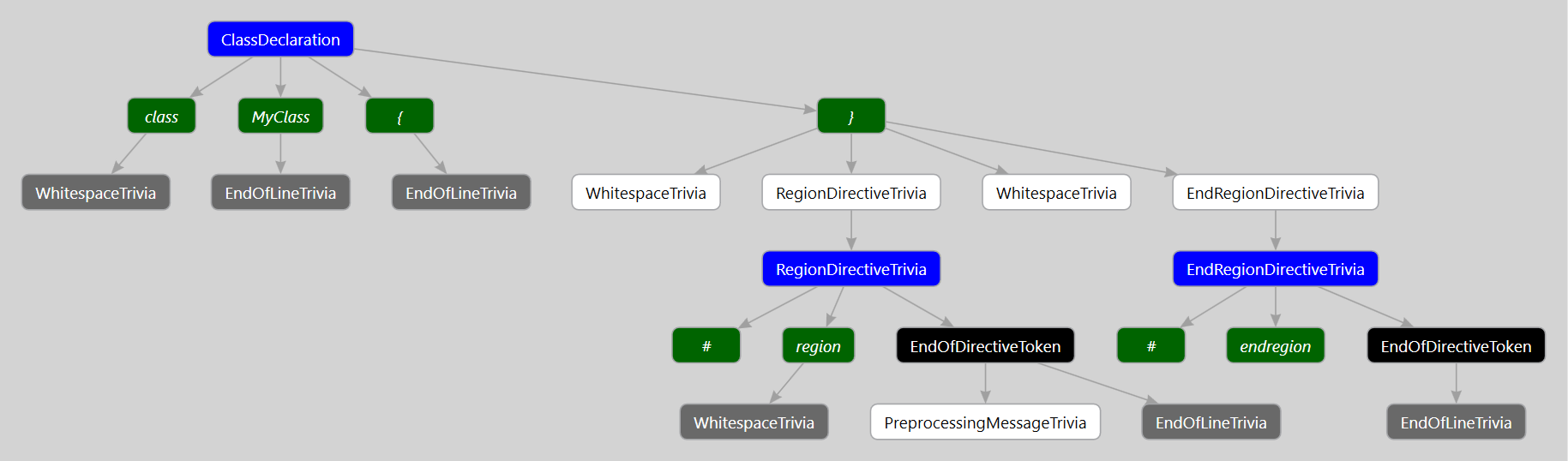
Structured trivia are an interesting corner case within Roslyn. Take a look at the following syntax tree representing a simple program with regions.
This file contains hidden or bidirectional Unicode text that may be interpreted or compiled differently than what appears below. To review, open the file in an editor that reveals hidden Unicode characters. Learn more about bidirectional Unicode characters
Typically the terminals of a Roslyn syntax tree are pieces of trivia. However, in the above program we can see that a RegionDirectiveTrivia has a child RegionDirectiveTriviaSyntax syntax node.
Well, why don’t we try getting access to these syntax nodes? Originally, I tried the following:
This file contains hidden or bidirectional Unicode text that may be interpreted or compiled differently than what appears below. To review, open the file in an editor that reveals hidden Unicode characters. Learn more about bidirectional Unicode characters
Oddly enough (to me, at least), neither of these approaches worked and both returned nothing. They also didn’t throw or indicate any error on my part. Thankfully @Pilchiepointed out that DescendantNodes has a couple of optional arguments.
Func<SyntaxNode, bool> descendIntoChildren - A function that decides whether or not we should descend into the children of a given node. We could use this to avoid descending into nodes we know we don’t care about.
bool descendIntoTrivia – A simple boolean that signals if we’d like to descend into the children of trivia when searching for nodes.
In our case, we’d like to search for syntax nodes within trivia, so we’ll signal that.
This file contains hidden or bidirectional Unicode text that may be interpreted or compiled differently than what appears below. To review, open the file in an editor that reveals hidden Unicode characters. Learn more about bidirectional Unicode characters
This time, everything works as we’d expect and we get access to our RegionDirectiveTriviaSyntax node as expected.
So why does Roslyn avoid descending into trivia by default? My guess is performance. Most consumers of Roslyn will be looking for nodes such as methods, properties, and fields. None of these are contained within syntax trivia so it would be a waste of CPU cycles to consider their children.
This is something to be aware of when working with structured trivia and something that’s not immediately obvious.
I’m happy to announce the release of a project we’ve been working on at Code Connect called Source Browser.
Source Browser is based off of Kirill Osenkov’s Reference Source tool. The basic idea is that we can take C# files and generate static HTML that is linkable and searchable.
Want to see what that method invocation does? Just click it.
Want to see where that property was defined? Just click it.
It’s a simple concept, but it makes it an absolute joy to explore third party libraries your software depends upon. At Code Connect we use the Roslyn Reference Source on a daily basis.
Source Browser currently supports open source C# and VB.Net projects hosted on GitHub. Just provide the link to your GitHub repository to get started.
Further Development
We built Source Browser with more than C# and VB .Net in mind. We’re hoping to add support for other statically typed languages such as F# and C++. We’ve worked on an intermediate model that we believe most static languages can theoretically fit into. This means once a source file for a given language is converted to this model, Source Browser is language agnostic. We’re hoping individuals will work with us to create”converters” for other languages.
Special Thanks
We’re especially grateful to the following individuals who helped commit code to Source Browser. Their advice and guidance has helped shape this tool.
Unlimited project size
We’ve used Code Connect on projects spanning millions of lines of code
Reduced loading time
Code Connect starts in just seconds
A responsive and clean user-interface
Hold <ALT> to highlight the relationships between nodes
If you’re using Visual Studio 2013, we haven’t forgotten about you! You can enjoy the above improvements in Code Connect for Visual Studio 2013 as well!
Up until this point we’ve been working with C# code on a purely syntactical level. We can find property declarations, but we can’t track down references to this property within our source code. We can identify invocations, but we can’t tell what’s being invoked. And God help us if we want to try to solve the really hard problems like overload resolution.
In this developer’s opinion, the semantic layer is where the power of Roslyn really shines. Roslyn’s semantic model can answer all the hard compile-time questions we might have. However, this power comes at a cost. Querying the semantic model is typically more expensive than querying syntax trees. This is because requesting a semantic model often triggers a compilation.
There are 3 different ways to request the semantic model:
To avoid the boiler plate involved in setting up our own Workspace, we’ll simply create compilations for individual syntax trees as follows:
This file contains hidden or bidirectional Unicode text that may be interpreted or compiled differently than what appears below. To review, open the file in an editor that reveals hidden Unicode characters. Learn more about bidirectional Unicode characters
Before continuing, it’s worth taking a moment to discuss Symbols.
C# programs are comprised of unique elements, such as types, methods, properties and so on. Symbols represent most everything the compiler knows about each of these unique elements.
At a high level, every symbol contains information about:
Where this elements is declared in source or metadata (It may have come from an external assembly)
What namespace and type this symbol exists within
Various truths about the symbol being abstract, static, sealed etc.
SemanticModel.GetSymbolInfo() accepts expression syntax (eg. InvocationExpressionSyntax) and returns a symbol. If the model could not successfully resolve a symbol, it provides candidate symbols which can serve as best guesses.
Below, we retrieve the symbol for a method via it’s declaration syntax. We then retrieve the same symbol, but via an invocation (InvocationExpressionSyntax) instead.
This file contains hidden or bidirectional Unicode text that may be interpreted or compiled differently than what appears below. To review, open the file in an editor that reveals hidden Unicode characters. Learn more about bidirectional Unicode characters
The documentation for SemanticNode notes the following:
An instance of SemanticModel caches local symbols and semantic information. Thus, it is much more efficient to use a single instance of SemanticModel when asking multiple questions about a syntax tree, because information from the first question may be reused. This also means that holding onto an instance of SemanticModel for a long time may keep a significant amount of memory from being garbage collected.
Essentially, Roslyn is allowing you to make the tradeoff between memory and computation. When querying the semantic model repetitively, it may be in your best interest to keep an instance of it around, instead of requesting a new model from a compilation or document.
Next Time
We’ve only scratched the surface of the Semantic Model. Next time we’ll take a look at the control and data flow analysis APIs.



 Shotgun Debugging